Showing posts with label programming. Show all posts

Monday, April 25, 2016

Robotics and Engineering Excitement

We recently went to the learning commons area (formerly known as the library) to try some new robots and other engineering materials.  It was a VERY popular learning experience and will not be our last trip!

Here are some students hard at work using magnetic pieces to create a marble maze!  There is quite a bit of trial and error as students try to get it right.


These are the Dash robots.  Each one can do something different.  Programming one to drive a path on the floor or another one to play a tune was great learning fun!


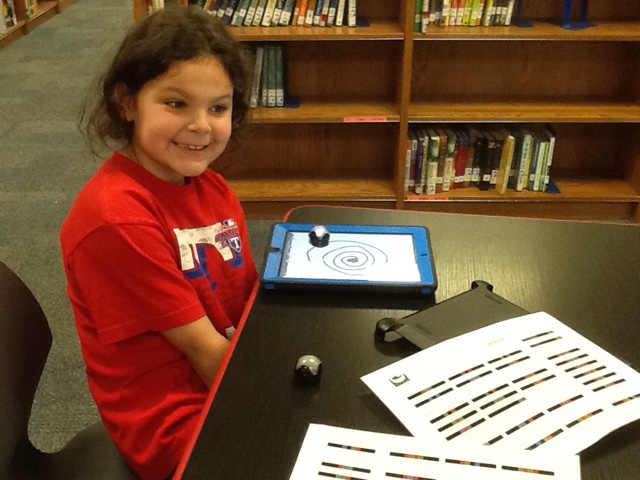
Then we tried the little Ozbots that follow the colored lines on a surface to control where they move and what special things they can do.  Students used markers on paper to draw a pathway and tell their Ozbot to speed up, spin, or other commands.  We had a whole page of commands students could choose from.


Another station the students enjoyed was also using the Ozbots, but instead of using markers on paper to code the pathway, students used a drawing app on the iPad and the robots followed that path right on their screen!


All of these activities required students to plan ahead, check whether their plan was working, and revise to make things happen the way they intended.  The sequence of the instructions mattered and students had to pay attention to detail for things to work right.  Students are learning about different coding systems and about the way objects move and behave.  Some activities required negotiating with partners to complete the task and some were independent.  All of these skills will be useful in many areas of the curriculum and in real life!


Wednesday, February 24, 2016

Engineering Week at Cannon!

Our big excitement for this week was getting started on Lego WeDo Robotics in class!  Some of the students have been looking forward to this for a long time.  After some introductory puzzles with Ms. Pettit during last Friday's rotations, we got started today building our first project: the lion!  Students followed onscreen directions with their partner, gathered the pieces and followed the steps to build the lion, including connecting it to the laptop.  Then they followed the directions to complete the drag-and-drop program on the screen.  Finally it was time to see if they were successful.  If they typed a on the keyboard, the lion sat up and roared.  If they typed b, it lay down and snored.  Many students had time to make a short video of their lion in action that you can watch on their iPads.  A few even finished with enough time left to modify the program and change the lion's actions or the sound effects.  Everyone was excited and left the media lab looking forward to our next robotics session!  

In these pictures you can see the process they went through and the finished lion.  Check out these looks of concentration as they work!


We had also listened to the story The Most Magnificent Thing earlier this week and created plans for inventions they would like to have to solve a problem of some sort.  Some of the ideas included a robot to bathe kids for parents, a toy washer to clean toys, a garbage picker so the garbage men don't have to pick up the bags themselves, a machine to make noises so little sisters or brothers wouldn't bother you, a freeze ray, a gravity gun, and a flying car.  Today we used Google Hangout to connect with Ms. Read's class at O. C. Taylor and both classes shared their ideas!

Our last big activity for Engineering Week will be some extra building and design time on Friday.  That should be a fun way to wrap a week of fun and learning!

We have read about some famous inventors, practiced the way engineers draw and label plans for their designs, created a design to solve a problem just like other inventors do, followed plans to build something, and tested and fixed things that were not working.  These are some of the things engineers do, but these are also skills that can be applied to anything students want to do in life!


Thursday, May 29, 2014

Coding in 1st Grade

Now that our nest building project is finished, we have been working on computer coding in class in several different ways.  Students are learning to think through a task logically and put the steps in the correct sequence.  They have to test their program and fix errors, then test again.  With so many electronic devices in the world, from our computers, iPads, and smartphones to microwaves, thermostats, and cars, coding is a skill that will be required in many future careers!  We have several great iPad apps that teach coding in a fun gamified way.  Kids love to play Kodable especially.  We also recently used a website called learn.code.org and another app called Hopscotch to write some more complex code.  

This week the kids designed roads and then programmed the robot roamers to follow the path and stay on their road.  Here are some robot programmers in action.  Notice the code they were writing down on their iPads in many of the pictures - the arrows that tell the robot which way to go.  Isaiah even invented his own shortcut way of writing the code.  Instead of writing 4 forward arrows, he just wrote one arrow and put a 4 under it to show how many times to repeat that command!


Friday, February 28, 2014

Learning to Code

Today my class learned some more about writing computer programs.  We have already worked on this with apps like Kodable and Hopscotch.  The students are learning to put the commands they want to use in a logical order to carry out a task.  Today we went to a website called learn.code.org and created our own versions of the Flappy Bird game.  The website has a nice tutorial that took us through the process step-by-step and then the final step was to design their own game.  Some students made the game character change locations as they played or created a game where you got points for crashing on the ground - a point for each bounce!  Some kids created an endless game that you can never lose.  Most of the kids have posted a link to their game on our class blog today.  You can try out their games by going to their posts here.  You can also go to the original site and try to make your own version or let your child show you how they program the game.  Here's my undersea version!